


DHL Express MyDHL API
DHL Express MyDHL API offers both domestic and international services for shipping to and from destinations worldwide.
This guide provides developers with the details needed to build DHL Express MyDHL API shipping capabilities into your ShipStation API workflows.
Requirements

| Property | Type | Required? | Description |
|---|---|---|---|
dhl_shipper_number | string | required | Your DHL Shipper Account Number |
api_key | string | required | Your DHL account API key |
api_secret | string | required | Your DHL account API secret |
dhl_duties_taxes_number | string | Optional | Your DHL Duties Taxes Account Number |
dhl_location_finder_api_key | string | Optional | Your DHL Location Finder API Key |
go_green_plus | boolean | Optional | Select this option to default GoGreen Plus on all orders. Applies to International deliveries only. |
use_my_own_commercial_invoice | boolean | Optional | Print my own commercial invoice rather than the DHL invoice (not eligible for paperless trade). Disables the shipment as PLT. |
provide_commercial_invoice_outside_of_auctane | boolean | Optional | * Provide my own commercial invoice electronically to DHL outside of Auctane. |
shipper_business_party_role_type | string | Optional | * * Business party type of the shipper. |
return_label_validity_period | string | Optional | Return Label/QR Code Validity Period |
PROPERTY DESCRIPTIONS
provide_commercial_invoice_outside_of_auctane. Using this property, you agree, "I will ensure my commercial invoice is provided electronically to DHL to support paperless trade shipping. I understand that shipments cannot be transported without the commercial invoice being provided to DHL electronically, and where necessary, printed and affixed to the package for non-paperless trade shipments."- **
shipper_business_party_role_type. This information is used for international shipping and placed on the commercial invoice for compliant customs clearance. Allowed values are:business,direct_consumer,government,other,private,reseller.- ***
return_label_validity_period. Defines the duration that return shipment data information is stored in the carrier’s systems and the return label and/or the QR Code remains active and can be used. Allowed values are:
3 months,
6 months,
12 months,
24 months,
PT,
PU,
PV,
PW.
Shipping Requirements
- All shipments require both weight and dimensions.
Connect Account
You can connect a DHL Express MyDHL API account using the POST method to the /v1/connections/carriers/ endpoint, or via the ShipStation API Dashboard.
Connect via Endpoint
carrier_name: dhl_express_mydhl
POST /v1/connections/carriers/:carrier_name
Sample request:
Once connected, use the carrier_id returned in the response for all future account requests.
Connect via Dashboard
Find steps to connect via the ShipStation API dashboard in the DHL Express MyDHL API help center page.
Rates
DHL Express MyDHL API supports rate shopping with ShipStation API.
Rates Received: Prices are always returned in the currencies based on the contract signed between the carrier and the merchant.
- Order Rate Calculator: Supported
- Toolbar Rate Calculator: Not Supported
Service Details
Available DHL Express MyDHL API services are provided below. Please note that carriers may update their available services at any time. To ensure you are always using valid services, you can use the list carrier services endpoint at any time.
Domestic Services
| Service | API Code |
|---|---|
| DHL Domestic Express 09:00 | dhl_express_mydhl_domestic_express_09 |
| DHL Domestic Express 12:00 | dhl_express_mydhl_domestic_express_12 |
| DHL Domestic Express | dhl_express_mydhl_domestic_express |
| DHL Medical Express Domestic (doc) | dhl_express_mydhl_medical_express_domestic_doc |
| DHL Express Domestic 10:30 | dhl_express_mydhl_domestic_express_1030 |
International Services
| Service | API Code |
|---|---|
| DHL Economy Select (nondoc) | dhl_express_mydhl_economy_select_nondoc |
| DHL Express 09:00 (doc) | dhl_express_mydhl_express_09_doc |
| DHL Express 09:00 (nondoc) | dhl_express_mydhl_express_09_nondoc |
| DHL Express 10:30 (doc) | dhl_express_mydhl_express_1030_doc |
| DHL Express 10:30 (nondoc) | dhl_express_mydhl_express_1030_nondoc |
| DHL Express 12:00 (doc) | dhl_express_mydhl_express_12_doc |
| DHL Express 12:00 (nondoc) | dhl_express_mydhl_express_12_nondoc |
| DHL Express Worldwide (doc) | dhl_express_mydhl_express_worldwide_doc |
| DHL Express Worldwide (nondoc) | dhl_express_mydhl_express_worldwide_nondoc |
| Economy Select EU | dhl_express_mydhl_economy_select_eu |
| Express Worldwide EU | dhl_express_mydhl_express_worldwide_eu |
| DHL Express Envelope | dhl_express_mydhl_express_envelope |
| DHL Medical Express (nondoc) | dhl_express_mydhl_medical_express_nondoc |
| DHL Medical Express (doc) | dhl_express_mydhl_medical_express_doc |
Optimizing Customs Data for International Shipments to Prevent Delays
To ensure smooth customs clearance and minimize the risk of shipment inspections or delays, it is critical to provide high-quality data for every international shipment. Poor data quality, specifically vague descriptions and missing HS codes, often triggers manual reviews by destination authorities.
Key Takeaways for Merchants
- Be Literal: Describe the item as if you are explaining it to someone who cannot see it.
- Include Part Numbers: If your product has a Part Number (PAN), include it in the reference field to help customs verify the item.
- The "Rule of Three": A great description usually answers What it is, What it's made of, and What it's for.
Write Accurate Line Item Descriptions
Customs authorities need to know exactly what is being imported, what it is made of, and its intended use. Avoid using internal marketing descriptions or vague terms.
- Avoid Stop Words: Words like "Sample," "Variety," or "Gift" are frequently flagged and may trigger an automatic inspection. This is a List of Common Stop Words.
- Include Material Composition: For items like footwear or apparel, specify the materials (e.g., "Men’s jeans, 80% cotton, 20% polyester" instead of just "Jeans").
- Detail the Product Type: Instead of "VINTAGE FOOTWEAR," use "Women’s shoes - leather upper and rubber sole."
- Be Specific: Instead of "Wheel adjusted," use "Bicycle rear pivot part."
Utilizing Harmonized System (HS) Codes
Providing a correct HS code (or Commodity Code) is the most effective way to help customs officials categorize your goods.
- US-Based Shippers: Use the US Census Bureau’s Schedule B Search Engine to find the correct code.
- Global Shippers: Ensure you are using the most current codes required by the destination country to avoid incorrect duty/tax calculations.
Provide Part and Reference Numbers
When possible, include the specific part or item number in your commercial invoice data. Mapping these to the correct reference fields in your shipping tool (e.g., the "PAN" reference type) provides an extra layer of clarity for clearance agents and helps verify the item against the provided description.
Prohibited Stop Words & Description Comparison
Using vague language is the fastest way to get a shipment flagged for inspection. Below are examples of poor descriptions found in recent audit data versus the clear, detailed descriptions required by customs authorities.
| Poor Description (Vague) | Better Description (Detailed) | Why it Matters |
|---|---|---|
| VINTAGE FOOTWEAR | Women's shoes: leather upper, rubber sole | Defines gender, material, and sole type. |
| JEANS | Men’s jeans: 80% cotton, 20% polyester | Specifies material composition for textiles. |
| SAMPLE / VARIETY | Stainless steel kitchen whisk (K792) | Stop Words like "Sample" or "Variety" trigger automatic flags. |
| HAIR PRODUCT | Organic argan oil hair serum (100ml) | Identifies the specific substance and volume. |
| The Mesa - Medium | Canvas messenger bag with brass buckles | Moves past marketing names to actual physical traits. |
Merchant Checklist: International Shipping Compliance
To ensure your international shipments clear customs without delay, use this checklist to review your data before printing your labels.
- Is the description specific? (e.g., "Men's 100% cotton t-shirt" instead of "Apparel")
- Did you avoid Stop Words? (Ensure "Sample," "Gift," and "Variety" are not used)
- Is the material composition listed? (e.g., "Stainless steel," "Leather," "Plastic")
- Is the HS code/Commodity code included? (Use a search tool if you aren't 100% sure)
- Is the Part Number (PAN) mapped correctly? (Helps verify the item in the clearance system)
- Is the unit value and currency accurate? (Ensure values match your commercial invoice)
Description Logic: The "Physical" Rule
When writing descriptions, ignore your marketing names. Customs authorities don't know what a Polaris IGX 144+ Linkage Kit is. Instead, describe the physical object: Steel mechanical linkage parts for vehicle suspension.
Technical Note: Mapping Compliance Data
When integrating with international carriers, how you map data fields in your API payload directly impacts customs clearance rates. While the UI may show a single "Description" field, the backend mapping should prioritize the following:
- Reference Field Mapping (PAN) To assist customs authorities in verifying shipments against digital records, ensure that product part numbers are mapped to the correct reference type.
- Reference Type: PAN (Part Number)
- Usage: Map your internal SKU or manufacturer part number here. This allows clearance systems to match the physical item to the digital declaration more efficiently.
- Data Integrity vs. UX Display It is important to note that what the customer sees in the ShipStation or Shopify UI may not always reflect the full data payload sent to the carrier.
- Payload Enrichment: Even if a merchant uses a short marketing title in their store, the integration should attempt to send the most granular
descriptionavailable in the product database to thedescriptionfield in the customs object. - Stop Word Scrubbing: Consider implementing a validation layer that flags or prevents the use of Stop Words (Sample, Gift, Variety) in the
descriptionfield before the API call is finalized. This is a List of Common Stop Words.
- HS Code Automation
Automating the
harmonized_tariff_codefield is the highest-value optimization you can provide. Ensuring this field is populated with a 6 to 10-digit code reduces the reliance on the text description alone, as the code provides a universal language for customs agents worldwide.
NOTE: Action Required: :nz: New Zealand Border Levy Changes
Effective April 1, 2026, a new NZD $2.21 (+ GST) levy applies to low-value air freight consignments entering New Zealand. This fee is separate from the 15% GST already being collected, and it applies per package, not per item.
To see how this change impacts your shipping rates and carrier invoices, see the Shipping to New Zealand: Low Value Goods (LVG) Levy section of International Shipments.
Shipping from Great Britain to Northern Ireland
DHL Express MyDHL API will support the B2B movement types for shipping from Great Britain to Northern Ireland, in accordance with the Windsor Framework.
The Windsor Framework applies when the following conditions are met:
- the shipment is from Great Britain to Great Britain,
- the sender’s postal code does not start with “BT”,
- the recipient’s postal code starts with “BT”.
To comply with the Windsor Framework, the following changes are required for the Non-Document shipment creation process.
- The shipment is flagged as dutiable in the API request, and the selected Incoterm is provided. If you select an Incoterm, we will pass it to the carrier’s API.
- Invoice line-item data is provided. If you provide all the products' (items) data, we will pass that data to the carrier’s API in the invoice section.
- A UKIMS number is provided in the
registrationNumberssection of the API request using type code “IMS”. This is required for B2B shipments when using the Green Lane.registrationNumbers sectionof the API request using type code “IMS” describes the carrier’s API field. In ShipStatio API, it istax_identifiers.valuewithtax_identifiers.identifier_type="ukims". - For B2B shipments sent on the Red lane (and preferred for the Green lane), you are required to use paperless trade (PLT) to provide a copy of the invoice.
- No changes are required for Document shipments.
For more information, see Implementing a DHL Integrated Solution: Windsor Framework Requirements with My DHL API.
Return Services
DHL Express MyDHL API supports creating return labels, but you must have DHL’s agreement to use the Label-free solution.
During carrier account setup, merchants can select the Return Label/QR Code Validity Period. This setting determines how long return shipment data is stored and how long labels or QR codes remain active for use.
The allowed validity periods are:
- 3 months
- 6 months
- 12 months
- 24 months
The carrier offers a Label-free shipping feature where the driver prints the label upon pickup via a QR code. However, the carrier advises against this for high-volume shipments, as they will not print labels for large quantities.
Returns are only available with the following services:
- DHL Express Domestic - N
- DHL Economy Select (nondoc) - H
- DHL Express Worldwide (nondoc) - P
- DHL Economy Select EU - W
- DHL Express Worldwide EU - U
and shipment parameter is_return set to "true".
IMPORTANT:
Label-free service availability is provided in the DHL Label-Free Pickup & Drop off Configurability (1).xlsx file. Neither the carrier nor the ShipEngine Connect will validate those values. It is the customer's responsibility to properly offer this solution to their clients. The DHL Operations or Sales will keep this table up to date and inform the customer.
Packages
The following carrier package types are available for DHL Express MyDHL API services:
| Name | Abbreviation | API Code | Package Attributes |
|---|---|---|---|
| Card Envelope | 1CE | dhl_express_mydhl_1ce | International, Domestic |
| Express Envelope | XPD | dhl_express_mydhl_xpd | International, Domestic |
| Box 2-A | 2BX | dhl_express_mydhl_2bx | International, Domestic |
| Box 2 (Cube) | 2BC | dhl_express_mydhl_2bc | International, Domestic |
| Box 2 (Flat) | 2BP | dhl_express_mydhl_2bp | International, Domestic |
| Box 3 | 3BX | dhl_express_mydhl_3bx | International, Domestic |
| Box 4 | 4BX | dhl_express_mydhl_4bx | International, Domestic |
| Box 5 (Jumbo Small) | 5BX | dhl_express_mydhl_5bx | International, Domestic |
| Box 6 | 6BX | dhl_express_mydhl_6bx | International, Domestic |
| Box 7 | 7BX | dhl_express_mydhl_7bx | International, Domestic |
| Box 8 (Jumbo Large) | 8BX | dhl_express_mydhl_8bx | International, Domestic |
| Tube Small | TBS | dhl_express_mydhl_tbs | International, Domestic |
| Tube Large | TBL | dhl_express_mydhl_tbl | International, Domestic |
| Your Own Package | YOP | dhl_express_mydhl_yop | International, Domestic |
Adding Shipment Insurance
DHL Express MyDHL API supports adding carrier insurance to shipments created with ShipStation API. Shipping insurance allows for coverage up to the declared value. This means that the insurance amount should not exceed the all-products-declared value.
Review our insurance page for details on adding insurance to your shipments.
Label Support
- Label sizes: 4" x 6", 4" x 8". ShipStation API requires you to select the "label_layout": "letter" setting for 4" x 8" labels.
- Label formats: PDF, PNG, ZPL
- Supports Unicode characters: YES
Label Reference Fields
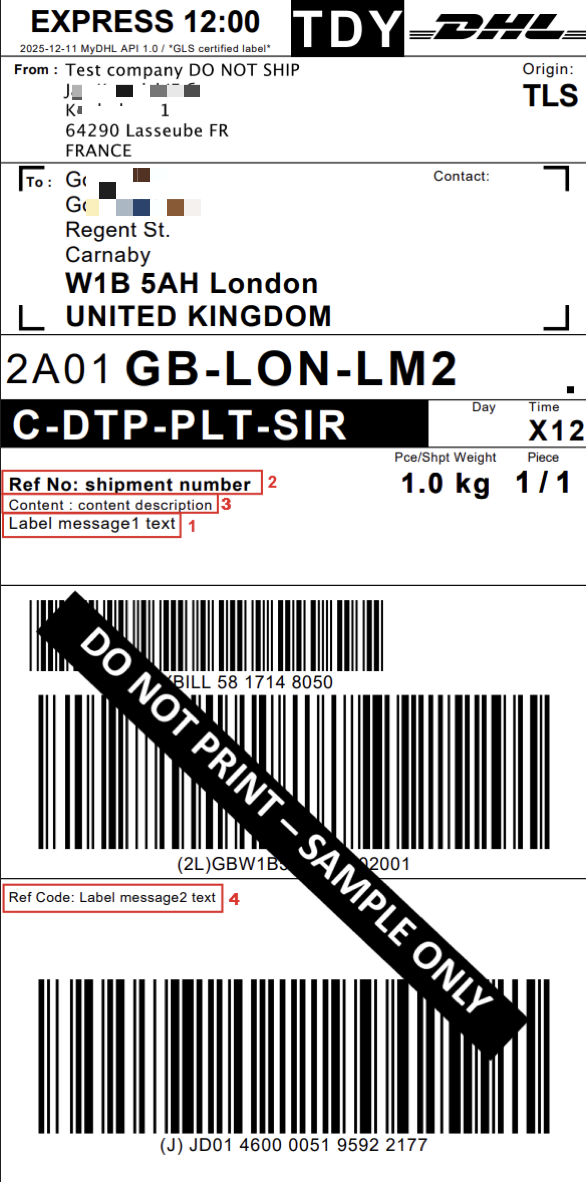
DHL Express MyDHL API supports adding custom label messages.
Label messages map in the following way:
shipment.packages.label_messages.reference1displays as a free, text label messageshipment.shipment_numberor if not filled in, thenshipment.external_shipment_iddisplays as Ref Nopackages[].content_descriptiondisplays as Contentshipment.packages.label_messages.reference2displays as Ref Code (customer reference), but only when the 4x8 size is selected.
Multi-Package Labels
DHL Express MyDHL API supports creating multi-package shipments for all available services, except for the label-free shipping feature.
See our Multi-Package Shipping page for details about creating multi-package labels.
Label Branding
The ShipStation API integration with DHL Express MyDHL API does not support label branding. This feature is only available in the ShipStation UI.
Voiding Labels
You can void labels internally via the ShipStation API, but this will not sync with the carrier.
DHL Express does not support electronic voiding through their API. While you can void the label in our system for record-keeping, DHL simply advises merchants to discard any unused labels.
DHL Express bills a merchant for the label at the completion check-point (not at the 1st scan, not at label generation). There should be no consequences from the carrier for not using the label generated by their system.
Paperless Labels
DHL Express MyDHL API supports paperless labels. Please see the Return Services section above.
Customs Declarations
DHL commercial invoices are available to download from the forms_download object in the label response.
- Shipments to the UK need to have Freight Costs on the Commercial Invoice
When you connect the carrier account to ShipStation API, you can select the option ‘Use my own commercial invoice’. The default integration behaviour is to apply Paperless Trade/Automated Digital Imaging (PLT/ADI) on all orders. By selecting this option, you can turn it off and use your own commercial invoice or a fully non-PLT flow.
Paperless Trade (PLT)
Paperless Trade (PLT) is the regulatory term used when a customs regime will accept either data or electronic images to perform the customs clearance. For PLT shipments, the shipper only needs to print the transport label. No customs paperwork needs to be printed and handed over to DHL.
Non-PLT countries require a physical hardcopy of the paperwork to be provided by the shipper and affixed to the package to ensure it was not altered or > manipulated during transit. Wherever accepted, usage of the Paperless trade service is mandatory. There are a few scenarios where the shipment won’t be eligible for PLT, typically one of the following:
- a) one of the countries in the origin/destination pair doesn’t support PLT, or
- b) the declared value exceeds the maximum value allowed for one of the countries.
Automated Digital Imaging (ADI)
Automated Digital Imaging (ADI) is a benefit for Non-PLT shipments to reduce physical paperwork printing. DHL automatically stores the commercial invoice and waybill doc images and makes them available to authorized DHL staff globally. Therefore, to be compliant for non-PLT shipments, the shipper simply needs to print a copy of the commercial invoice and affix it to the sleeve on the package.
Use my own commercial invoice is not selected (OFF)
When Use my own commercial invoice is not selected (off), ShipStation API sends to the myDHL API a special service code WY** with bypassPLTError** feature on. It works for the following services only:
DHL Express Worldwide (nondoc) - P,
DHL Express 09:00 (nondoc) - E,
DHL Express 12:00 (nondoc) - Y,
DHL Economy Select (nondoc) - H,
DHL Express 10:30 (nondoc) - M,
DHL Medical Express (nondoc) - Q
The WY special service code denotes the shipment as PLT, and the availability of the invoice data and DHL-generated invoice meets the data and image validation criteria for PLT. No need to print anything other than the transport label for the package.
**bypassPLTError - The default behavior of the DHL API is to return an error if PLT is requested but not available. The bypassPLTError feature will process the shipment successfully, convert the shipment from PLT to ADI, and return a warning message to print the customs paperwork as opposed to returning an error.
Use my own commercial invoice is selected (ON)
When Use my own commercial invoice is selected (ON), then neither the WY special service code nor the bypassPLTError feature is used. The shipper will be on fully manual/non-PLT, and will need to physically print the commercial invoice and give the paperwork to the carrier. For this scenario, ShipEngine will request the waybill document on all shipments from myDHL API as well as the commercial invoice doc. Waybill Docs are required to print and give to the carrier, along with a hard copy of the commercial invoice for shipments that aren’t processed as PLT or ADI.
For merchants who want to control which particular international shipments they apply a PLT solution to, use another configuration. Select the Use my own commercial invoice option and set the shipment parameter advanced_options.paperless_invoice to true. With this setup, only the shipment with this advanced option selected will be sent with the WY special service code. The bypassPLTError feature would not be applied. If the PLT is not available for a particular shipment, then the customer will receive an error from the carrier's API.
To avoid violating the arrangements with the carrier, it is important to remember that the configuration of the ShipEngine/ShipStation/DM/MPM or any other internal generic commercial invoice document is not allowed for this integration.
Find more information on pages 20-24 of the carrier’s Solution Provider Companion Guide.
Delivery Confirmation
| Confirmation Type | API Code | Carrier Code | Description |
|---|---|---|---|
| Signature Required | request.confirmation=None | N/A | No mapping to the carrier API. Signature is included in the services |
| No Signature Required | request.confirmation=Signature | SX | Signature is required for the shipment to be delivered. This signature may be a neighbor, building manager, or the recipient can authorize the release of the package (without being present). |
| Adult Signature | request.confirmation=AdultSignature | SD | Requires a signature from someone 21+ with government-issued photo ID upon delivery. It is commonly used for alcohol, tobacco, firearms, or high-value items. |
| Direct Signature | request.confirmation=DirectSignature | SF | Commonly used for valuable or sensitive items that require guaranteed delivery to the specified, authorized recipient. |
See our Delivery Confirmation page for more details about using the confirmation property.
Advanced Options
DHL Express MyDHL API supports certain advanced options, which you can add to the shipment object when creating a shipment or label.
| Option | Code |
|---|---|
| Saturday Delivery | advanced_options.saturday_delivery |
| Duties Taxes Paid | advanced_options.duties_taxes_paid |
| Bill Duties to Sender | advanced_options.bill_duties_to_sender |
| Paperless Invoice | advanced_options.paperless_invoice |
| Direct Signature | advanced_options.DirectSignature |
| Delivery to Neighbour | advanced_options.delivery_to_neighbour |
| Windsor Framework Details | advanced_options.windsor_framework_details.movement_indicator |
| 300 DPI label | advanced_options.label_300dpi |
To ensure you always have the most up-to-date information about a carrier's advanced options, use the list carrier options call.
Manifests
DHL Express MyDHL API does not require manifesting your shipments.
Scheduling Pickups
DHL Express MyDHL API supports scheduling pickups using ShipStation API.
Pickup scheduling is available as well as Pickup cancelling, and there are no cancellation fees.
When scheduling pickups:
- The date should not be a past date or a date more than 10 days in the future.
- The time is the local time of the shipment based on the shipper's time zone.
Delivery to a Service Point (PUDO)
DHL Express MyDHL API supports delivery to a service point (PUDO) for all DHL Express services.
Service point information is retrieved from the DHL Location Finder API and contains the data required for sending and receiving parcels. The integration can retrieve service points within a specified radius. The DHL Location Finder API limits results to a maximum of 50 locations per request and supports a maximum radius of 1,000,000 meters.
The integration includes a GetServicePoint() method that returns full details for a selected service point by its DHL Service Point ID.
See our Intro to Service Points for more details about how to use service points with ShipStation API.
Tracking
ShipStation API's integration with DHL Express MyDHL API supports receiving tracking updates via API (Single-Item). Review our Track a Package guides for details on tracking with the ShipStation API.
Dangerous Goods
To send Dangerous Goods (DG) shipments with DHL Express MyDHL API, customers must have approval on their DHL Account Numbers. Approval is given for specific ServiceCodes/ContentIds (Contract sign off).
If customers send DG shipments without approval or a contract, then those shipments will be stopped in the DHL facility.
See the ShipStation API Dangerous Goods page to learn which dangerous goods objects and properties you should use, about properties required by various carriers to indicate you are shipping dangerous goods (DG), and how to remain in compliance with the carrier's dangerous goods shipping requirements.
Create a Dangerous Goods Shipment
To create a DG shipment, the following DHL-specific values are required in the request: [DangerousGoods.ServiceCode] and [DangerousGoods.ContentId].
For specific Request elements, see the DHL Express Dangerous Goods.pdf.
Notes about Dangerous Goods Shipments
The customer is responsible for the correct packaging of the shipment, including additional labels, stickers, and documents (as required by the Dangerous Goods regulations).
ShipStation API-implemented logic to calculate ContentID/ServiceCode is based on the DangerousGoods data provided in the request. Logic covers the vast majority of potential use cases. However, we are not able to calculate some ContentIds.
Any regulation changes (ADR/IATA) might trigger changes on the DHL side, and consequently, ShipStation API logic to find/calculate ContentId/ServiceCode. In that possibility, please contact [email protected] if the algorithm is missing anything and if additional Analyst/DEV work might be required to accommodate the new regulations.
-
Please see the DHL Shipping dangerous goods: Guidelines and best practices page for more details.
-
See also the MyDHL API Reference data guide - 2.8.0.pdf page.
Notes and Limitations about DHL Express MyDHL API
ShipStation API currently cannot pass this Warning Message at label creation to print the customs paperwork:
"warnings": [ "7988: Please note on printing the hardcopy of all the shipment paperwork and affix it to the package." ]
Additional Notes
bypassPLTError - The default behavior of DHL’s API is to return an error if PLT is requested but not available. The bypassPLTError feature will process the shipment successfully, convert the shipment from PLT to ADI, and return a warning message to print the customs paperwork instead of returning an error. bypassPLTError=true is used as a default setup in the integration.
Automated Digital Imaging, or ADI, is a benefit for Non-PLT shipments to reduce physical paperwork printing. DHL automatically stores the commercial invoice and waybill doc images and makes them available to authorized DHL staff globally. Therefore, to be compliant for non-PLT shipments, the shipper simply needs to print a copy of the commercial invoice and affix it to the package sleeve.
Disconnecting Your DHL Express MyDHL API Account
See the Disconnect section in our Delete a Carrier page for the process of deleting or disconnecting a carrier from ShipStation API.
NOTE:
If you disconnect a carrier account and reconnect it, the account will have a new
carrier_idin ShipStation API.