


USPS (Stamps.com)
Stamps.com with ShipStation API provides access to USPS domestic and international shipping services for packages originating in the United States.
This guide provides developers with the details needed to build USPS shipping capabilities using a Stamps.com account into your ShipStation API workflows.
If you are using or plan to use the USPS services included with ShipStation API, rather than connecting your own Stamps.com account, see our USPS from ShipStation guide.
Requirements

| Property | Type | Required? |
|---|---|---|
username | string | required |
password | string | required |
Connect Account
You can connect a Stamps.com account using the POST method to the /v1/connections/carriers/ endpoint, or via the ShipStation API Dashboard.
For instructions on connecting a Stamps.com account via the ShipStation API dashboard, go to our Stamps.com help article.
Connect via Endpoint
carrier_name: stamps_com
POST /v1/connections/carriers/:carrier_name
A successful connection will return a response with the carrier_id, which you'll use for any requests for this account going forward.
Rates
Use the rates endpoint to fetch estimated rates for services provided by Stamps.com. See our Calculate Shipping Costs page for details about rate shopping with ShipStation API.
Service Details
The tables below provide the services available with Stamps.com, which include both USPS and GlobalPost services. Please note that carriers may update their available services at any time. To ensure you are always using valid services, you can use the list carrier services endpoint at any time.
USPS Domestic Services
| Service | Transit Time | Maximum Dimensions (LxWxH) | Max Weight | Service Code |
|---|---|---|---|---|
| USPS Ground Advantage* | 2-5 days | 22" x 18" x 15" | 70 lbs | usps_ground_advantage |
| USPS Priority Mail | 1-3 days | varies by package type | 70 lbs | usps_priority_mail |
| USPS Priority Mail Express | 1-2 days | L x 2xW x H cannot exceed 108" | 70 lbs | usps_priority_mail_express |
| Media Mail | 2-9 days | L x 2xW x H cannot exceed 108" | 70 lbs | usps_media_mail |
IMPORTANT: USPS International Shipping Updates
International Mail Service Suspensions - Effective: March 3, 2026
The Postal Service™ is temporarily suspending acceptance of items destined to the following countries, due to logistics impacts resulting from the conflict in the Middle East. Please refrain from mailing items addressed to the countries listed here until further notice:
Algeria, Armenia, Bahrain, Djibouti, Eritrea, Iran, Iraq, Israel, Kuwait, Libya, Madagascar, Oman, Pakistan, Qatar, Seychelles, Syria, Tanzania, United Arab Emirates
HS Codes Required
As of September 1, 2025, the U.S. Postal Service will require all international commercial shipments to include a six-digit Harmonized System (HS) code on customs declarations for each item, regardless of mail class. The HS code system, created by the World Customs Organization, is used by customs authorities worldwide to classify goods and assess tariffs. This update aligns USPS mailing standards with new Universal Postal Union (UPU) regulations, also taking effect Sept 1, requiring all member countries to enforce six-digit HS codes for commercial goods.
For a full list of Harmonization Codes, use the Harmonized Tariff Schedule search.
USPS International Services
| Service | Transit Time | Maximum Dimensions | Max Weight | Service Code |
|---|---|---|---|---|
| USPS First Class Mail Intl | 7-21 days | L x 2xW x H cannot exceed 136" | 64 oz | usps_first_class_mail_international |
| USPS Priority Mail Intl | 6-10 days | L x 2xW x H cannot exceed 108" | 70 lbs | usps_priority_mail_international |
| USPS Priority Mail Express Intl | 3-5 days | L x 2xW x H cannot exceed 108" | 70 lbs | usps_priority_mail_express_international |
NOTE: All international shipments using USPS First-Class Mail Int'l, Priority Mail Int'l, or Priority Express Int'l services will use Global Advantage Program labels by default.
GlobalPost Services
GlobalPost international services are also available under the USPS from ShipStation carrier, as USPS is the official first-mile carrier for GlobalPost shipments originating in the US. For all GlobalPost services, transit time will vary depending on the destination country.
| Service | Max Weight | Service Code |
|---|---|---|
| GlobalPost Economy Intl | 4.4 lbs | globalpost_economy |
| GlobalPost Standard Intl | 70 lbs | globalpost_priority |
| GlobalPost Plus | 66 lbs | gp_plus |
| GlobalPost SmartSaver Economy Intl | 4.4 lbs | globalpost_economy_smart_saver |
| GlobalPost SmartSaver Standard Intl | 70 lbs | globalpost_priority_smart_saver |
| GlobalPost Plus SmartSaver | 66 lbs | globalpost_plus |
Return Services
Stamps.com supports returns using any domestic service. Review the Return Shipping Labels page for details on creating return labels with ShipStation API.
Packages
The following carrier package types are available for USPS services:
| Package Name | API Code | Package Details |
|---|---|---|
| Medium Flat Rate Box | medium_flat_rate_box | Domestic and international |
| Flat Rate Envelope | flat_rate_envelope | Domestic and international |
| Small Flat Rate Box | small_flat_rate_box | Domestic and international |
| Large Flat Rate Box | large_flat_rate_box | Domestic and international |
| Flat Rate Padded Envelope | flat_rate_padded_envelope | Domestic and international |
| Flat Rate Legal Envelope | flat_rate_legal_envelope | Domestic and international |
Adding Shipment Insurance
Stamps.com supports adding carrier insurance to your shipments.
Review the Parcel Insurance page for details on adding shipment insurance with ShipStation API.
Label Support
- Label sizes: 4" x 6"
- Label formats: PDF, ZPL
Label Reference Fields
Label messages are supported for domestic shipments only. You can use all three label reference fields.
Multi-Package Labels
USPS does not support multi-package shipments at this time.
Label Branding
Stamps.com supports adding a custom label image to your labels. See our Create Custom Shipping Labels page for details.
Voiding Labels
Stamps.com supports voiding labels using ShipStation API, but it must be done within 28 days of label creation and the label cannot have been scanned by the USPS.
See our Void a Label page for details about voiding labels with ShipStation API.
Paperless Labels
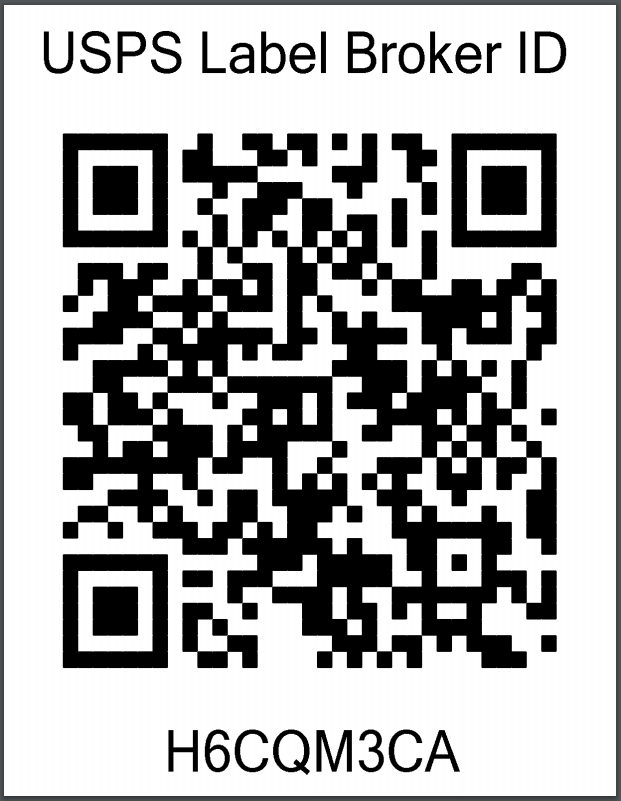
USPS supports paperless labels with their services. This means you can generate a QR code for your customer, and they can take that QR code to be scanned at participating USPS locations, who will then print the label for them.
Review our paperless labels page for details on how to generate a QR code instead of a printable label. Use the paperless value for the display_scheme property.
Example QR Code
Customer Communications
Using paperless labels might be a new experience for your customers. The USPS suggests sending out an email with the QR code label to help educate your customer on what they need to do to ship their package.
The email containing the QR Code should also include instructions on how to find participating USPS Post Offices by visiting https://tools.usps.com/find-location.htm?locationType=po&serviceType=lbroretail&address=18702, where the value of the address parameter is a customer's ZIP Code (such as 18702 in this example). The USPS Retail Associate at that location's Retail Counter will scan the QR Code, print the shipping label, affix it to the package, and provide a receipt.
If the customer has access to a printer, they may choose instead to print the label directly at https://tools.usps.com/label-broker.htm?LabelID=XYZZYPJK&zip=18702, where XYZZYPJK is the Label ID returned by ShipStation API, and 18702 is the ship_from postal_code.
Customs Declarations
Customs declarations for GlobalPost and GAP labels are submitted to the carrier electronically. See our International Shipments page for details about shipping internationally via ShipStation API.
NOTE: Action Required: :nz: New Zealand Border Levy Changes
Effective April 1, 2026, a new NZD $2.21 (+ GST) levy applies to low-value air freight consignments entering New Zealand. This fee is separate from the 15% GST already being collected, and it applies per package, not per item.
To see how this change impacts your shipping rates and carrier invoices, see the Shipping to New Zealand: Low Value Goods (LVG) Levy section of International Shipments.
Delivery Confirmation
| Confirmation Type | API Code | Description |
|---|---|---|
| No confirmation | none | Default. When no delivery confirmation is requested. |
| Delivery | delivery | For general delivery confirmation. |
| Signature | signature | A signature is required to complete the delivery. |
| Adult Signature | adult_signature | An adult signature is required for the shipment to be delivered. |
| Restricted delivery | restricted_delivery |
Signature and Adult Signature confirmation types are not supported for international shipments.
See our Delivery Confirmation page for more details about using the confirmation property.
Advanced Options
Stamps.com supports certain advanced options, which you can add to the shipment object when creating a shipment or label.
| Option | Name | Default Value | Description |
|---|---|---|---|
| Non Machinable | non_machinable | false | Indicates that the package cannot be processed through USPS sorting machines. |
| Dangerous Goods | dangerous_goods | false | Indicates this shipment contains dangerous goods |
To ensure you always have the most up-to-date information about a carrier's advanced options, use the list carrier options call.
NOTE: USPS Business Account Setup & NSA Rate Connection Guide
You can connect your USPS Business Account and NSA Rates to ShipStation API via the dashboard.
To ensure your account connects successfully and applies the correct rates, please review the guide that best matches your current setup:
- Setup Overview & Requirements: Learn how the USPS Business Portal and Enterprise Payment Accounts (EPA) work together.
- New Customer Setup: Follow these steps to link a brand-new USPS Business Account to your platform.
- Existing Customer Migration: Use this guide if you already have a Negotiated Service Agreement (NSA) and need to link it.
Manifests
USPS supports creating manifests (called SCAN forms) via ShipStation API. If you plan to create a USPS SCAN form, you must manifest your day's shipments by 9pm local time.
See our Manifests page for more details about creating manifests with ShipStation API.
Scheduling Pickups
USPS supports scheduling pickups with ShipStation API. Pickups can only be scheduled one day in advance. For example, if you schedule a pickup on the 5th for the 7th, the pickup date scheduled by Stamps.com will be the 6th.
See our Schedule a Carrier Pickup page for more details about scheduling pickups using ShipStation API.
Service Points (PUDO)
USPS does not support shipping to service points.
Tracking
ShipStation API's integration with Stamps.com supports receiving tracking updates. Review our Track a Package guides for details on tracking with the ShipStation API.
Disconnecting Your Stamps.com Account
See the Disconnect section in our Delete a Carrier page for the process of deleting or disconnecting a carrier from ShipStation API.
NOTE:
If you disconnect a carrier account and reconnect it, the account will have a new
carrier_idin ShipStation API.